Showing posts with label kids. Show all posts

Monday, October 17, 2011

The Intel Classmate by Chester Creek

Earlier today, I was browsing articles online, and I came across this list of tech innovations that could change the world. Included on this list are improved sanitation, alternative energy, and one item we're fairly familiar with here at Chester Creek:  The Intel Powered Classmate. The Classmate is part of an initiative by Intel to bring technology to children across the world.  In fact, they have sent over four million laptops to places with low technology availability like Argentina.

The Chester Classmate - a rugged and portable tablet PC laptop with color-coded keyboard.

This rugged tablet computer is particularly suited to the task at hand.  The tablet PC has been created to be durable, with a rugged case - drop tested from desk height - and some models have also been tested in extreme temperatures.  The other thing that really sets this line apart is that they include a "software suite of education tools to help teachers in the classroom," and keep students engaged.
You can read more on Intel's press release fact sheet.  You can also see Chester Creek's own version of the Classmate with the our unique, color-coded keyboard
specially designed to improve typing skills in students on our website.

Friday, July 15, 2011

Temper Tantrums

Today I was talking to some people about education and the topic of temper tantrums came up. With younger children, especially, this can be a trial for both parents and teachers. This can be an even tougher challenge when it involves children with special needs.

I found an interesting article about tantrums that suggested that by merely helping children to identify emotions, we can help them stay calm. When someone can not only recognize that they are getting upset, but also why, it becomes much easier to take a moment to put that feeling away and focus on something soothing.

In the same vein, but for a different reason, it helps if the people around, adults especially, make a point of noticing how a child is feeling.  The expression of empathy alone can make the difference.  Children who feel ignored are much more likely to act out.  That may seem like common sense, but so often its tempting to try to ignore something and make it go away.

Some other strategies for calming a child before the tantrum erupts include giving them space, avoiding stressful situations like hurrying, encouraging the to distract themselves with a physical activity or something they are very interested in, and suggesting deep breathing.

Wednesday, June 8, 2011

Effects of Computer Use on Students

As technology is becoming more and more prevalent in both our society and our school systems, students and teachers are integrating computer use into most every aspect of learning.  Since the advent of affordable computers for individuals, there have been studies focusing on the impact these resources have on the students.


  • In 1994, Jame Kulik found that students who used computer-based instruction scores at the 64th percentile, compared to students in control conditions without computers, who scored in the 50th percentile.
  • He also found that students learn more when instruction incorporates technology, and students have a more positive attitude when classes include computer-based learning.
  • In 1998, Jay Sivin-Kachala found that students saw a positive impact on all major subject areas when in technology rich environments.  This increased achievement occurred from pre-school to high school and in both regular and special ed classrooms, though the depth of impact depended upon many factors.
  • He, like Kulik, noted that student's attitudes improved when computers were used for instruction.
  • Dale Mann conducted a study of the West Virginia Basic Skills/ Computer Education initiative in 199, and found that participation in computer eduction raised students' scores on standard tests.    The largest improvement was seen in low-achievement students.
  • He also found that girls and boys benefited equally from computer access.  
  • Moreover, Mann found that computer education was more cost effective than reducing class size, increasing instructional time, and cross age tutoring programs.
  • Findings by Harold Wenglinsky in 1998 are supportive of the above findings, as they relate to fourth- and eighth-grade students.  His study was controlled for socioeconomics, class sizes, and teacher characteristics to ensure accuracy and significance of the findings pertaining to technology.
  • These references are from an article, "The Impact of Education Technology on Student Achievement" by John Schacter.

Wednesday, May 4, 2011

Distributors, eh? Our Friends North of the Border

Chester Creek produces computer keyboards, mice, and accessories that are available world wide.  We ship right here in Duluth all the way to the land down under.  But we could never do it without help.  It's time to give some credit where credit is due.  We're going to start off with our nearest neighbors to the North: Canada, eh?

Chester Creek has a handful of distributors in the great white North that is Canada, but today, we are going to focus on just three. Special Needs Computer Solutions offers their consumers the nicest and newest assistive technology.  With hundreds of items ranging from ergonomic work stations to portable Braille printers to large-print keyboards (you already knew that part, didn't you?).  Special Needs Computer Solution puts the focus on support, including consultation and training for the products they carry.  Check them out online here.

Aroga has been providing assistive technologies to their consumers for twenty-three years.  Look to Aroga for vision aids, communication aids, physical access products, and education tools.  Not only do they offer a variety of products, they also offer a variety of resources.  Aroga provides information on training, events, and the latest low-vision news.   Find all this and more here.

Last but not least is Bridges.  Bridges brings together a team of professions to bring their customers great assistive technology.  They offer direct sales as well as professional developement in both English and French.  As their vision statement says, Bridges aims to:
  • To provide a wide-offering of solutions to individuals with special needs that will facilitate their successful participation in all areas of their life.
  • To promote awareness of Assistive Technology and the impact that it has on individuals with special needs.
  • To promote successful implementation of Assistive Technology through professional development programs (that increase knowledge, skill and application of Assistive Technology).
 Take a look at their offerings here.

Of course, the one thing all these companies have in common is a devotion to bringing their consumers the best new products and the most reliable old favorites - including an array of Chester Creek products.

Sunday, May 1, 2011

Tricky Terms, part two: CPSIA

Earlier this week, we discussed RoHS, the Restriction of Hazardous Substances directive, as well as what that means for you and for us.  Today, I'd like to take a bit of your time to take a look at another acronym you will find on most Chester Creek products: CPSIA.

CPSIA stands for Consumer Product Safety Improvement Act.  This act was passed in 2008 in the wake of several recalls and scares involving faulty toys and products with high lead content.  It authorizes a higher budget for  the Consumer Product Safety Commission, creates stronger restrictions, imposes deadlines, and calls for increased penalties for failure to comply.

Lead
The CPSIA calls for reduction of lead in children's products to fall first to 600 ppm, then 300 ppm, then 100 ppm, and sets deadlines for these standards.  The standards apply retroactively to everything on store shelves.

Testing
The CPSIA also make testing of all products meant for children mandatory.  Products must be tested for restricted substances and must have certificates of compliance that provides standard information, including applicable rules, dates of manufacture, etc... in English.

Chester Creek diligently ensures that all of it's children's products meet or exceed requirements set out by not only the CPSIA, but RoHS as well.

Thursday, April 28, 2011

Building a Better Mouse

Building a better mouse - that's a large part of what we're about here at Chester Creek: better mice, keyboards, and computer accessories for you.  That's why our mice are designed so carefully, from the standard-sized ReaderMouse with its incredible comfortable grip to the ChesterMouse, designed for those who have the hardest time.

Our three small mice are the ChesterMouse, the LittleMouse, and the TinyMouse.  All three are sized to fit a child's hand, which also happens to be just about perfect for many individuals with motor or dexterity struggles.  These mice are easier to grip, and the buttons are easier to reach.  Like the ReaderMouse, all of our small mice have optical tracking.  This means no trackball to clean or lose.  Smooth optical tracking makes use of a mouse even easier.


The ChesterMouse


The ChesterMouse is a favorite with parents and teachers of young children as well as special-ed instructors. The Chester features one large button, keeping confusion about left- and right-clicks out of the equation.  You'll never have to worry about accidental right click changes.  Further, this mouse is both sturdy and extremely easy to use for those with dexterity issues.  In many situations, users are even employing the ChesterMouse as a more affordable alternative to a capability switch.

The LittleMouse
Next on our line up of small mice is the LittleMouse.  Chester Creek's LittleMouse, as its name implies, is small, an easy fit for little hands.  With two buttons, its perfect for those learning to use a computer and for those who don't want or need the distraction of a scroll wheel.  Featuring teacher requested color coding, the LittleMouse's left click is "Green for Go," while the right click is "Red for Stop," making learning easier than ever.


The Tiny Mouse
Our final small size mouse (as of now) is the TinyMouse.  Like the ChesterMouse and LittleMouse, the Tiny Mouse is half the size of a standard computer mouse.  It fits easily into the tiny hands of children, with buttons easily controllable for those who struggle with dexterity or arthritis.  The TinyMouse features both left- and right-clicks, as well as a smooth-rolling scroll wheel.  The color-coded buttons can be found on our TinyMouse as well, this time in bolder red, blue, and yellow, depending on the mouse.  That's right, the TinyMouse comes in both black and white to match your computer and keyboard.
The FunKeyBoard & FunMouse

For even more fun, check out our FunKeyBundle; with a bright red case, fun, color-coded buttons, and a matching FunMouse to boot, computing has never been more fun.  Our FunMouse is just like a TinyMouse with even more eye-catching color.

As always, Chester Creek has worked hard to bring you only the best in computer accessories.  All of our small mice - the Tiny, Little, and Chester Mouses - feature rugged construction and a one-year warranty on home use (six months for institutional use).  Additionally, these mice are RoHS and CPSIA compliant, completely safe for your loved ones, young and old.

Monday, April 11, 2011

Summer Learning Loss

Summer is on its way.  Can you smell it in the air?  I can smell it in the fog rising off the lake.  Even out here in the Northland, the snow is all but gone and the first flowers are blooming, little green and purple surprises.  Accordingly, kids all over are feeling that anxious itch for summer vacation.  To be honest, I am too, even though it doesn't mean vacation for me anymore.

Summer has one downside, though.  Summer learning loss.  Studies have found that on average, students lose about one month's worth of learning over the summer.  This number varies across demographics, location, and subject.  In fact, students tend to lose just over two and a half months of math knowledge.  Low income students tend to be set back about two months of reading.

Only about 9% of students K-12 in the US attend summer programs.

So how can you keep your students on track through their summertime adventures?  How about incorporating it into their daily life?  Learning doesn't only happen in the classroom.  Have them pick up a book, and talk with you about it when they've finished reading.  Take them on nature walks and explore the wonder of the world around you.  You can learn together.  Educational computer games are fun for a rainy day, too.  Check out Chester Creek's new educational software packs for computer adventures through science, logic, math, and more! Throw in a LessonBoard to teach them good typing skills while they're at it - a skill sure to come in handy next fall, giving them a leg up over their peers.

Tuesday, March 1, 2011

I AM the Pro

The last couple days here at work, I have been using a LessonBoard Pro.   This is one of our newest products.  The keys are all colored by which digit one should be using to press them.  I'll admit, although I type reasonably quickly, I do not type well. And there is a difference.  When I type, I use my ring fingers almost not at all.  And my pinkies, I use only for the "stretch" keys, if you will.   So with my thumbs, index, and middle fingers, I type at a moderate pace - about 70 words per minute. I know that sounds pretty fast.  But sitting here at my desk for the last few days, I have been trying to type more correctly.  While the adjustments I am making (paired with the lack of labels) is slowing me down a bit, I can feel how much smoother the typing goes.

This is going to be a learning process.  I only wish I had learned things right in school.  We had typing class, of course, but the software has no idea which fingers you use where.  Since I didn't particularly care either, at that time being a rather average typist for a third grader, I learned some bad habits that I bump up against a million times a day.  They tangle me up, slow me down, and get my letters switched around - ask anyone I email on a regular basis.

So now, I am relearning to type.  And its not as hard as one might think.  But I am so glad I'm not using those typing diagrams from elementary school this time around.  I can actually see where I'm going.  It's sort of like turning the lights on.  And that said, the lack of labels isn't really so bad for me.  But then, I've been using a keyboard hours a day for the last decade.  Pausing to look for the letters is probably responsible for a food third of my normal typos.  Once I get my fingers going the right places, I'll be flying.

Tuesday, February 22, 2011

Germs! Ewwwwwwww

The last few days, I've been doing research on germs (ewwwww) and bacteria and the like.  I am officially considering germaphobia as a life choice.  Although, really, that seems like a lot more effort that I would want to put forth.  Anyways, here is some of what I've learned.  (Those with children in school may not want to read the following.)


Forty percent of parents say that they have sent their children sick to school in the last year.  That is a lot of sick kids running around in school.  In fact, in Minnesota, where we are located, thirty-two schools have reported outbreaks of influenza-like illness in the last week alone.  That includes only cases of illness that were reported.  There have also been more than thirty hospitalizations and one death in MN in the last week due to the flu.  In a report from England, the median length of stay in a hospital for influenza was over 10 days. Ten days of serious hospitalization!   In the US, thirty-five percent of children under five who contract the flu suffer from serious complications.

The average American child will have 6.5 colds a year, and each will last three to five days. One person each second catches the common cold in the US alone.  Children are more than twice as likely as adults to contract a cold.  This is because as adults, we have had many of these strains of colds before and our bodies have immunities built up.  We don't get sick as often, because we got sick a lot in the past.

Parents - ready for the scary stuff?
Seventy percent of classrooms are not regularly disinfected by custodians.  Classrooms are the number one workplace for germs.  Contrary to popular belief, floors and toilets are some of the cleanest surfaces in school.  The yuckiest include desktops, paper towel dispensers, water fountains, and computers.  A keyboard actually has on average three times the concentration of bacteria as an animal cage.  Bacteria found on the above listed surfaces include high concentrations of e. coli, pneumonia, streptococcus, salmonella, and staph.   Some of these bacteria can live for days and even grow if left unchecked.  Even disinfecting can be tricky, as the more effective products must be left on a surface for approximately ten minutes - hardly practical on computer equipment and between classes.  And its important to disinfect throughout the day when items are in use almost constantly; tests have shown that germs build rapidly throughout the day,.   In one tested environment, influenza A was found on 13% of surfaces in the morning and on 50% by afternoon.  An even more startling statistic - at least for me: only 58% of girls and 48% of boys in high school wash their hands after using the lavatory.  


Are you as freaked out as I am?

Some solutions include seals for keyboards and mice that can be sanitized, placing hand sanitizer at every doorway in schools, and washing, washing, washing of hands.

But still.

Wednesday, February 16, 2011

Colors of the Wind

"I found I could say things with color and shapes that I couldn't say any other way - things I had no words for."
-Georgia O'Keefe

We see the world around us through an array of colors. Red apples, green grass, blue skies. The colors we see affect our impression of the things that we are seeing, whether we know it or not. For instance, a bright red has been shown to stimulate the autonomic nervous system, creating a slight change in pulse and blood pressure. These effects occur because color is perceived, not only on the surface of the brain, but also in the limbic system, which is often referred to as the "primitive brain." Red, given this fact as well as its cultural associations, can influence people to be more risk-averse and detail-oriented. Even blind, color-blind, and blind-folded individuals have been shown to experience different physiological sensations under different color lights.

Blue and green, conversely, have been shown to have a calming effect on individuals and to stimulate creative thinking. Certain shades of blue have even been shown to slow the heart rate. It is for this reason that "cardiac blue" is so frequently used in medical centers and hospitals. The debate about certain color improving productivity has gone on for a long time. The truth is, different colors can encourage different types of productivity: red for detail-oriented work and blue for creative work. Blue has also been shown to act as an appetite suppressant. Yellow caution signs and the like work well because yellow is an attention-getting color. Too much yellow, however, can cause headaches and irritability because it over stimulates the eyes.
Similarly, experts advise refraining from over use of color. More than six bold colors in any one piece (wallpaper, for instance) can be overwhelming and inhibit cognition.

Children are usually drawn by warm, bight colors. Using these colors in learning environments can have very positive affects. A classroom decorated in friendly colors can reduce stress, improve visual processing, increase focus and attention span, and aid brain development in visual thinking, problem solving, and creativity.  In fact, color speeds up learning and retention by as much as 78% and use of bold colors (as oposed to black and white) can increase IQ by up to 12 points.  

For special needs children specifically, color can be either helpful or harmful, depending on how it is used. Regular, geometric patterns can be used to stimulate the pattern seeking part of the brain and reduce visual stress (in comparison with irregular or more complicated patterns). Autistic children in particular can be overwhelmed easily by color. Researchers have found that approximately 85% of autistic children see colors with greater intensity than do their neurotypical peers. This is not to say that the learning environment of a child with an ASD (Autism spectrum disorder) should be devoid of bright colors or decoration, but rather that bold colors should be used carefully, in that setting. In fact, we have heard from several parents and instructors that children on the spectrum benefit greatly from our colored keyboards because of the color-coding.

Dyslexic children generally benefit from well-used color.  A study has shown that 80% of dyslexic children showed increased understanding of read materials when displayed with a colored overlay.  Color-coding by character set can help with spelling on keyboards for those with dyslexia. Those with ADD and ADHD are also helped by the use of color.  Color has been shown to help with focus for these individuals as well as individuals with Down Syndrome by maintaining interest and breaking monotony.

The benefits of using more color are not limited only to children; repetition of colors has also enhanced the memory of nursing home residents and productivity across most demographics.

Tuesday, February 8, 2011

Software Bundles

I know, I know.  We've been telling you all about new products that we're coming out with, but actual introduction of the items for sale has been slow.

TextSpeak is up.  This is a great, ultra-portable little Augmentative Communication keyboard device that allows people to talk through their keyboard, no computer required. 


Braille Stickers are up.  These are the only Braille stickers for large-key keyboards, and are clear so that the large-print legend remains visible.


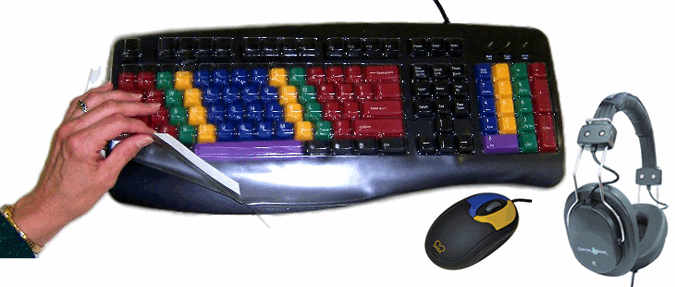
Headphones and the LittleMouse are new.  Chester Headphones are sturdy and adjustable enough for everyone, plus comfy and with convenient inline volume control.  The LittleMouse is perfect for kids still learning (color-coded!), or anyone who doesn't want to worry about a scroll wheel.


Large-key numeric pad is up coming soon.  This keypad is intended as a companion to any of our large-key keyboards for those who prefer the grid layout of numbers, but is also useful paired with any keyboard for those who like or need larger keys.  The keypad should be available by the end of the month.


The Wireless VisionBoard should be in by the end of the month, as well.  This keyboard is very similar to our VisionBoard, but includes f-keys, and will be available in black and white to start with.


We also have some great educational software bundles coming in soon.  We will be offering a pre-K bundle and an early elementary bundle, both of which will feature five titles.


The pre-K bundle will feature:


Baileys Book House
Millie's Math House
Trudys Time and Place House
Sammy Science House
Thinking Things Toony the Loons Lagoon

Our early elementary bundle will include:
Mighty Math Carnival Countdown
Reader Rabbit 1st Grade
Typing Instructor for Kids Platinum
Reader Rabbit 2nd grade
Zoombinis Island Odyssey

Thursday, January 27, 2011

Charter Schools

Yesterday, I wrote a little about homeschooling as an education option.  This is one route that provides huge flexibility and choice regarding structure and content.  Another non-traditional education path is the charter school.

Definitions for charter schools vary from state to state, as do laws, but generally a charter school is the following:

  • A public School.
  • Created when a group individuals petition a local school board or county board of education for a charter to open an independent school in their community.
  • Sponsored by another organization, such as a local university.
  • Typically founded by educators, parents, community groups or private organizations.
  • Operated under a written contract with a state, district or other entity. 
  • Required to meet local, state, or federal standards of education.


Furhter definitions can be found at US Charter Schools.  These schools can be part of a larger public school district, or an independent district supported by the state and sponsors.The National Charter School Study has found that the top three reasons charter schools are created is to gain autonomy, realize a vision, or serve a specific group. These goals are met in a variety of ways.  Charter schools' freedom allows them to structure the learning as they like.
Parents and teachers choose charter schools primarily for educational reasons--high academic standards, small class size, innovative approaches, or educational philosophies in line with their own. Some also have chosen charter schools for their small size and associated safety (charter schools serve an average of 250 students).  -US Charter Schools
 The charter school which I used to work for, Avalon School, for instance, accepts 180 students from grades 7-12 and emphasizes growth through project-based learning -- very different from the traditional public schools in the St. Paul area.

There are so many options for education available; what works best for your family?

Wednesday, January 26, 2011

Homeschooling

Homeschooling is an increasingly popular choice among American families.  The number of homeschoolers increases by over 8% annually, and about one million US families already homeschool, according to numerous studies by individuals, organizations, and the census bureau.  Why do people homeschool?  For a number of reasons, whether it be displeasure with the public option or a desire to build stronger family bonds.  As many reasons as there are for homeschooling, there are just as many approaches.  Some of the typical homeschooling approaches are listed here.

Two of the main concerns about homeschooling are whether the children will earn to socialize and whether or not they will match traditionally schooled peers in learning.  Studies have shown that contrary to the belief of some, homeschooled children tend to be more confident in social situations and less peer-dependant. As to the speed and quality of learning, every child learns differently.  This is true of homeschooled children as well as traditionally-schooled kids.  The quality of their learning depends entirely upon their natural abilities and the parents' commitment.  There is no reason a homeschooled child cannot have an education as good as or better than any public-school student.  The other worry is cost.  According to homeschool.com, one of the internet's largest homeschool networks, homeschooling can cost as little or as much as the parent's decide.  Resources include free work sheets and expenszive boxed curriculum.  Peripheral educational devices like computers can also be very important to learning.  Much of the free curriculum is available through the web, after all, and skills like typing and research are indispensable in today's world.

To help both traditional and non-traditional educational programs, Chester Creek offers a 10% discount for orders that can be verified as part of a library or education program.

What techniques do you use in your homeschooling adventures?

Monday, January 17, 2011

Learning to Type

Typing was once a specialized skill reserved for the business, secretarial, and writing communities.    These jobs were high paying and considered high skill.  With the advent of the internet and the propagation of computers into every facet of life, this is no longer an optional ability.  Employers are demanding this skill, even for low-wage, entry-level work.

Learning to type does not have to be difficult.

Finger position and muscle memory are at the core of typing.  Traditionally, a student must first memorize all of the keys on a keyboard and how they are arranged.  Remembering exactly which fingers go on which keys is the next important piece of memorization.  In many classrooms, papers are handed out that diagram proper placement.  This leaves students repeatedly checking screen, keyboard, and chart, losing momentum, and constantly making mistakes.  The color-coded keyboards of Chester Creek present the perfect solution.  Start your children out with a colorful FunKeyBoard or LearningBoard to help them learn key locations.  For even younger kids, we offer the large-key kids’ KinderBoard.  For the budding touch-typist in your life, we offer the LessonBoard.  This keyboard naturally guides learners into correct typing habits by simple color-coding.  We have also just added the LessonBoard Pro to our lineup. Color-coded, but lacking labels, the Pro forces students to memorize location of individual keys, but continues to encourage correct finger placement, reducing the urge to “peek” later in life.  The Pro is actually my personal favorite of all of our keyboards, because it is such an interesting but obvious way to encourage kids and adults to learn more quickly and learn "better."

Thursday, January 6, 2011

Kids' Keyboards

Children, in some cases even toddlers, are now using computers at home and in school. However, learning the keys can be very frustrating for a child. All the keys look the same, the typeface is small, and the keys are often hard to reach. Children become discouraged and confused trying to remember the location of specific letters. Chester Creek’s keyboards for kids are great tools. Specially designed, with bold color-coding for vowels, consonants, numbers, and function keys, our children’s keyboards eliminate frustration and stress, providing a valuable, fun, and successful learning experience.


Teaching a child to use a computer at an early age can give them a head-start advantage. Knowledge of computer use and navigation can help stream line the process of creating projects and doing research for school. Later in life, good typing skills can cut work time in half for essays and papers, and in the work environment computer skills are a must.

An investment in your child’s computer skills is an investment in their future. One of the best values on the market today is a keyboard from Chester Creek. Chester Creek produces keyboards that are safe, sturdy, and practical. With boards in both standard and large-key layout, color-coded by character-set or finger placement, CCT has everything your child will need to learn to type quickly and correctly. Additionally, Chester Creek mice are designed specifically with a child’s hands in mind. Smaller and easier to grip and use, a CCT child’s computer mouse is also long-lasting, well-constructed, and color-coded. Our mice come with one or two buttons and with or without a scroll wheel, depending on what you, the consumer, need.

Tuesday, January 4, 2011

Check out this Blog

Check out this blog by journalist and freelance writer Cindy Downes!

She's taking a look at one of my very favorite CCT products, the LessonBoard Our LessonBoard is coded by finger to help kids and adult alike learn to type in a quick and easy way.  I just wish we had had something like this in my typing class.  We also offer this sweet product as part of a really great classroom bundle, with TinyMouse, Headphones, and keyboard seal.
Buying as a bundle saves you more than $40!

While Cindy mentions covering the keys at a later date with tape, which can be sticky and inconvenient, CCT does also offer the SpeedSkin learning aid, which fit snuggly over the keys and is easily removeable, and will soon be offering keyboard, color coded like the LessonBoard for hand placement, which does not have letter labels at all.  You can expect to see this on the website soon. 

Monday, January 3, 2011

Moderate Monday Magics and High Visibility Keyboards

The only fun hijinks in the office here today include adventures in boxland and a heated discussion about the inadequacy of cordless phones.  With the rolling in of the new year comes the rolling out of old files.  Box them up and put them some place, never to be seen again. Of course, this involves assembling the boxes.  Watching Tasha do so? Mildly entertaining. Watching Karen make the attempt?  Hilarious.  They come in a big flat package, perforated cardboard sheets you magically fold into a box, the way a square of paper magically becomes an oragami crane.  Magic.  If you know how.  If you don't, hilarity.


Wednesday, December 22, 2010

Top Five Words of 2010

Continuing our countdown of Merrian-Websters top words of the year, we start off with number five.

5. Bigot. M-W defines bigot as "A person who is obstinately or intolerantly devoted to his or her own opinions and prejudices; especially : one who regards or treats the members of a group (as a racial or ethnic group) with hatred and intolerance."

Bigot earned its place on this list when Rick Sanchez, formerly a CNN anchor accused comedian Jon Stewart of being "a bigot," and implied that everyone running CNN was Jewish.

Even the greatest bigot in the world is forced to admit that the radical coloring on some of Chester Creek's products is rather attractive.

4. Landing in the top four is socialism: "Any of various economic and political theories advocating collective or governmental ownership and administration of the means of production and distribution of goods."

The term popped up surrounding a good number of news stories throughout the year, particularly stories about the federal bailouts and the health-care legislation.

Chester Creek does not endorse socialism; FunKeyBoards and Tiny Mice for everyone! But you'll have to buy your own.

3. The second runner up for the year is moratorium. I'm sure most of you in the US immediately think of the moratorium President Obama placed on off-shore oil drilling after the Gulf spill, and that is exactly why it made the list. A moratorium is "a legally authorized period of delay," or "a suspension of an activity."

There are no moratoriums on production at Chester Creek this season. We're working as hard as always to bring you our great products, in great time, and with great customer service!

2. Pragmatic made it almost to the top of the list. M-W defines pragmatic as "relating to matters of fact or practical affairs often to the exclusion of intellectual or artistic matters : practical as opposed to idealistic."

After the mid-term elections in November, politicians across the country began to talk about more pragmatic solutions to the nation's problems, in response to evidence that that voters were unhappy with the way things had been done lately.

Pragmatism need not prevent you from getting a fun new keyboard for yourself or a loved one any time soon. Our keyboards and mice are fun and practical, with large-print, colorful keys, and sturdy construction all year round.

1. And the number one word of the last year?
"Austerity"

When:
Lookups on Merriam-Webster began spiking around May 1, 2010.
Why:
Austerity figured prominently in news coverage of the economic panic and protests triggered by the debt crisis in Greece.
For example, as the New York Times reported,
"The Greek Parliament passed a package of tough austerity measures on Thursday, trying to stave off economic collapse and help prevent debt contagion from spreading." (Dan Bilefsky, May 5, 2010)
The definition for this sense of austerity says it all: "enforced or extreme economy."
The word's origins are – coincidentally – Greek; austerity comes from austÄ“ros, meaning "harsh" or "severe."
-Merriam-Webster

Even austerity in your budget need not preclude purchase. Chester Creek is offering 15% off our FunKeyBundle for the holiday season - plus free shipping!

Monday, December 20, 2010

Words of the Year and Shamelss CCT Plugs (It is our blog, after all)

As the end of the year draws nearer, Merriam-Webster has compiled a list of the top words of 2010.

10. At the bottom of this list is furtive. M-W defines this as
"done by stealth : surreptitious."

It makes the list because of the failed Times Square bombing in May. The bomber was described as looking furtively around. Used in a sentence:
No need for furtive, Christmas Eve wrapping - Chester Creek now offers gift wrapping!

9. Coming in at number nine is dissident, meaning, "disagreeing especially with an established religious or political system, organization, or belief; non-conformist."

It makes the list due to the Novel Peace Prize winner Liu Xiaobo, who is often described as China's best known dissenter.

Feeling a need to break the conformity of your office space? Try a fun and funky keyboard from Chester Creek. They're not just for kids anymore. (Our own Tasha uses a FunKeyBoard at her desk)

8. Eighth on the list is ebullient, "having or showing liveliness and enthusiasm."

This word was used by many journalists to describe the atmosphere of joy surrounding the rescue of the Chilean miners. Used in a sentence,
Looking forwards to an ebullient Christmas morning? Everyone will love a Chester Creek keyboard or mouse!

7. Ringing in at seven is shellacking,
"a decisive defeat : drubbing."

President Obama said
Now, I'm not recommending for every future president that they take a shellacking like I did last night. I'm sure there are easier ways to learn these lessons
of the 2010 elections.

While that is already a good example of use in a sentence, I'll go ahead and throw in my own:
No need for your checkbook to take a shellacking this holiday season. Save money on our FunKey Bundle Special!

6. Sixth on the list is doppleganger. M-W defines doppleganger as, "someone who looks like someone else," or, to put it simply, a person's "double."

Now, I'll admit it. I don't have a clever (haha) little plug for Chester Creek using the word doppleganger. So, here goes a completely unrelated example:
You look so much like Ally Sheedy from the Breakfast Club, you could be her doppleganger!
(I actually hear this all the time.)

Check back later in the week for the Top Five Words of the Year.

Wednesday, December 15, 2010

Sickness Season

This is the season of celebration and sickness.  It seems like everyone has a cold, or the flu. Here in the office, half of us are sick.  A big transfer of germs happens in schools.  One solution to this is the Chester Creek keyboard seal.  These are thin, clear, plastic membranes that fit neatly over the keys of a keyboard.  The seals are for use in home, office, or school, and can easily be washed and sanitized to prevent sharing of icky cold and flu germs. 

Categories

3d About us accessories add adhd adults adventures aid android antikythera app artsy asd assistice technology assistive technology augment autism back to school belgium big birthday blog boomer boxes braille bundle buzz canada catalog cd ces chater chest creek chester creek chester creek blog chester creek news chester mouse children childrens choice Christmas chrome church cnn coffee cold colored colorful comics coming soon commerce communication computer computer accessories computer accessorites computers computex consumer copptertop cpsia customer danbit denmark dexterity disability dissident distributors doppleganger duluth ebullient ed expo education elderly email employment eniac enviromental ergnomics ergonomics eye facebook facial recognition facts fall famous february fiber optics fiction flu funkeyboard funkeybundle furtive games genes German germs glaucoma google hacking handicap harbor Headset health heavy metals High visibility history holiday holidays holoday home school homeschool hypertext impaired impairment info information intel international internet ipad italian italy key guard keybaords keyboard keyboard seals keyboarding keyboards kids kidscomputer kinderboard kinect laptop large key large-key large-print lead learn to type learning lessonboard light links little low vision lumbar m-w macular degeneration magic malware mercury merriam-webster mice microsoft minnesota mobile motor mouse national school supply and equipment association netbook network new blog new products new technology new years news nssea number pad numeric occupation therapy occupational therapy office on-the-go outdoors peripheral phones photo portable posture productivity products announcements promotion proteins ramblings readerboard restriction review rohs safety sale sales scary school schools science scores search engines security senior seniors services shellacking shipping shopping sight silly social media social networking software spanish special education special needs special olympics specialneeds specials spectronics speech speedskin spring squirrels staff story students study summer suppliers tablet tablets taipei technology tests text speak textspeak the cloud tinymouse tips touch-typing trade show typing vacation viruses vision visionboard vocabulary wave weather web what's new wifi windows winter wireless words work wrapping www