Showing posts with label schools. Show all posts

Wednesday, March 16, 2011

Show Season

It’s that time of the year again. Chester Creek gearing up for a flurry of trade shows this spring.  First on the list this year is the NSSEA.  This is the National School Supply and Equipment Association’s Ed Expo, down in San Antonio.  April 7-9, this show is running at us head on.  Meg, Kathy, and our newest colleague, Paul, will be attending. 
Ed Expo is the world's premier Back-to-School purchasing event, specifically geared toward helping the educational products/ parent-teacher retailer, cataloger and full-line distributor find the best teaching tools and resources for the classrooms of today, tomorrow and the future.
Providing an unsurpassed opportunity to see thousands of products and to comparison shop, Ed Expo is the ideal venue to exchange ideas with peers and keep a pulse on the market. In short, Ed Expo is vital for those who want to stay involved in our ever-changing industry.
Only at Ed Expo will you find the ultimate mix of networking, exhibits, and workshops all designed to help you and your business succeed.

Most of the attendees are the people who supply schools with their needs, rather than the schoosl themselves.  As such, we’ve got several meetings lined up with specific groups.  That said, there will always be someone at the booth to talk and answer any questions anyone has. 

We’re very excited about this expo – even more so than usual because this particular show encourages exhibitors to donate some of their show items to the Kids in Need foundation, rather than shipping them back home.  We are happy to say we will be donating several items to this charity foundation that works “to ensure that every child is prepared to learn and succeed by providing free school supplies nationally to students most in need.”

Monday, March 14, 2011

Spanish Keyboards

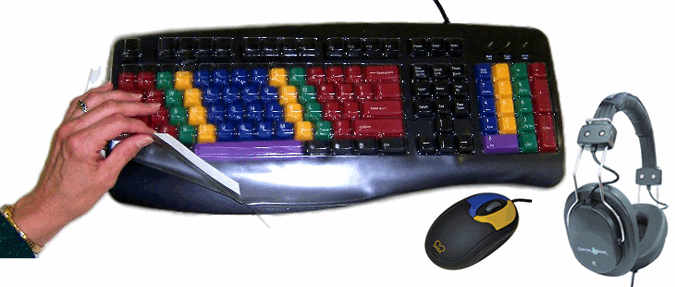
I honestly cannot say enough how cool I think this idea is. Spanish Keyboards. For homeschool or public school or just those learning Spanish. Maybe as a companion to Rosetta Stone, which you see in so many school and homeschool catalogs. These  keyboards are almost just like standard keyboards, but include the special characters for Spanish. They are also colored by character set to help those who may be less familiar with the keyboard. This way, students can learn to communicate in Spanish over their whole day, not just in school.  Plus, so many more advanced students have this challenge:  writing an assignment or essay in Spanish.  Hard enough already, right?  Then add in the need to have it nicely typed, either for teacher preference or because of poor handwriting.  Now you've added in the hassle of copy-pasting  special characters in, interrupting the flow of learning and typing.  With a Spanish keyboard, that goes away!  That easy.  And there is no software, these keyboards are plug and play!  That means you can plug the Spanish keyboard in when you want it, and plug its English counterpart back in when you're ready.  Isn't that cool?!  Check out our other products at www.chestercreek.com or call us for more info at 218-722-1837!

Wednesday, March 2, 2011

Tablets

As Apple rolls out its new iPad 2, competition waits anxiously.  While the first iPad faced virtually no competition in the tablet market, its predecessor is diving into churning waters.  The new device boasts two cameras, a slimmer build, video streaming to AppleTVs, and many of the features the iPhone4 included.

However, in order to be successful, this tablet will have to not only convince new buyers of its superiority, but also sway current iPad users to upgrade.

Competition includes the Motorola Xoom, Galaxy Tab, LG Slate, Acer Iconia, Dell Streak, HTC Flyer, BlackBerry PlayBook, and Playstation tablet, all of which bring something different to the table.  And what's more, many of these have been on the market for a while.  Certainly Android, the competing operating system, has a leg up with so many devices running its software.

What do you think?  Do you have a preferred OS, hardware manufacturer, or specific tablet?

Do you think these devices had a place in schools?  How about for assistive tech?

Tuesday, March 1, 2011

I AM the Pro

The last couple days here at work, I have been using a LessonBoard Pro.   This is one of our newest products.  The keys are all colored by which digit one should be using to press them.  I'll admit, although I type reasonably quickly, I do not type well. And there is a difference.  When I type, I use my ring fingers almost not at all.  And my pinkies, I use only for the "stretch" keys, if you will.   So with my thumbs, index, and middle fingers, I type at a moderate pace - about 70 words per minute. I know that sounds pretty fast.  But sitting here at my desk for the last few days, I have been trying to type more correctly.  While the adjustments I am making (paired with the lack of labels) is slowing me down a bit, I can feel how much smoother the typing goes.

This is going to be a learning process.  I only wish I had learned things right in school.  We had typing class, of course, but the software has no idea which fingers you use where.  Since I didn't particularly care either, at that time being a rather average typist for a third grader, I learned some bad habits that I bump up against a million times a day.  They tangle me up, slow me down, and get my letters switched around - ask anyone I email on a regular basis.

So now, I am relearning to type.  And its not as hard as one might think.  But I am so glad I'm not using those typing diagrams from elementary school this time around.  I can actually see where I'm going.  It's sort of like turning the lights on.  And that said, the lack of labels isn't really so bad for me.  But then, I've been using a keyboard hours a day for the last decade.  Pausing to look for the letters is probably responsible for a food third of my normal typos.  Once I get my fingers going the right places, I'll be flying.

Tuesday, February 22, 2011

Germs! Ewwwwwwww

The last few days, I've been doing research on germs (ewwwww) and bacteria and the like.  I am officially considering germaphobia as a life choice.  Although, really, that seems like a lot more effort that I would want to put forth.  Anyways, here is some of what I've learned.  (Those with children in school may not want to read the following.)


Forty percent of parents say that they have sent their children sick to school in the last year.  That is a lot of sick kids running around in school.  In fact, in Minnesota, where we are located, thirty-two schools have reported outbreaks of influenza-like illness in the last week alone.  That includes only cases of illness that were reported.  There have also been more than thirty hospitalizations and one death in MN in the last week due to the flu.  In a report from England, the median length of stay in a hospital for influenza was over 10 days. Ten days of serious hospitalization!   In the US, thirty-five percent of children under five who contract the flu suffer from serious complications.

The average American child will have 6.5 colds a year, and each will last three to five days. One person each second catches the common cold in the US alone.  Children are more than twice as likely as adults to contract a cold.  This is because as adults, we have had many of these strains of colds before and our bodies have immunities built up.  We don't get sick as often, because we got sick a lot in the past.

Parents - ready for the scary stuff?
Seventy percent of classrooms are not regularly disinfected by custodians.  Classrooms are the number one workplace for germs.  Contrary to popular belief, floors and toilets are some of the cleanest surfaces in school.  The yuckiest include desktops, paper towel dispensers, water fountains, and computers.  A keyboard actually has on average three times the concentration of bacteria as an animal cage.  Bacteria found on the above listed surfaces include high concentrations of e. coli, pneumonia, streptococcus, salmonella, and staph.   Some of these bacteria can live for days and even grow if left unchecked.  Even disinfecting can be tricky, as the more effective products must be left on a surface for approximately ten minutes - hardly practical on computer equipment and between classes.  And its important to disinfect throughout the day when items are in use almost constantly; tests have shown that germs build rapidly throughout the day,.   In one tested environment, influenza A was found on 13% of surfaces in the morning and on 50% by afternoon.  An even more startling statistic - at least for me: only 58% of girls and 48% of boys in high school wash their hands after using the lavatory.  


Are you as freaked out as I am?

Some solutions include seals for keyboards and mice that can be sanitized, placing hand sanitizer at every doorway in schools, and washing, washing, washing of hands.

But still.

Thursday, January 27, 2011

Charter Schools

Yesterday, I wrote a little about homeschooling as an education option.  This is one route that provides huge flexibility and choice regarding structure and content.  Another non-traditional education path is the charter school.

Definitions for charter schools vary from state to state, as do laws, but generally a charter school is the following:

  • A public School.
  • Created when a group individuals petition a local school board or county board of education for a charter to open an independent school in their community.
  • Sponsored by another organization, such as a local university.
  • Typically founded by educators, parents, community groups or private organizations.
  • Operated under a written contract with a state, district or other entity. 
  • Required to meet local, state, or federal standards of education.


Furhter definitions can be found at US Charter Schools.  These schools can be part of a larger public school district, or an independent district supported by the state and sponsors.The National Charter School Study has found that the top three reasons charter schools are created is to gain autonomy, realize a vision, or serve a specific group. These goals are met in a variety of ways.  Charter schools' freedom allows them to structure the learning as they like.
Parents and teachers choose charter schools primarily for educational reasons--high academic standards, small class size, innovative approaches, or educational philosophies in line with their own. Some also have chosen charter schools for their small size and associated safety (charter schools serve an average of 250 students).  -US Charter Schools
 The charter school which I used to work for, Avalon School, for instance, accepts 180 students from grades 7-12 and emphasizes growth through project-based learning -- very different from the traditional public schools in the St. Paul area.

There are so many options for education available; what works best for your family?

Wednesday, January 26, 2011

Homeschooling

Homeschooling is an increasingly popular choice among American families.  The number of homeschoolers increases by over 8% annually, and about one million US families already homeschool, according to numerous studies by individuals, organizations, and the census bureau.  Why do people homeschool?  For a number of reasons, whether it be displeasure with the public option or a desire to build stronger family bonds.  As many reasons as there are for homeschooling, there are just as many approaches.  Some of the typical homeschooling approaches are listed here.

Two of the main concerns about homeschooling are whether the children will earn to socialize and whether or not they will match traditionally schooled peers in learning.  Studies have shown that contrary to the belief of some, homeschooled children tend to be more confident in social situations and less peer-dependant. As to the speed and quality of learning, every child learns differently.  This is true of homeschooled children as well as traditionally-schooled kids.  The quality of their learning depends entirely upon their natural abilities and the parents' commitment.  There is no reason a homeschooled child cannot have an education as good as or better than any public-school student.  The other worry is cost.  According to homeschool.com, one of the internet's largest homeschool networks, homeschooling can cost as little or as much as the parent's decide.  Resources include free work sheets and expenszive boxed curriculum.  Peripheral educational devices like computers can also be very important to learning.  Much of the free curriculum is available through the web, after all, and skills like typing and research are indispensable in today's world.

To help both traditional and non-traditional educational programs, Chester Creek offers a 10% discount for orders that can be verified as part of a library or education program.

What techniques do you use in your homeschooling adventures?

Thursday, January 6, 2011

Kids' Keyboards

Children, in some cases even toddlers, are now using computers at home and in school. However, learning the keys can be very frustrating for a child. All the keys look the same, the typeface is small, and the keys are often hard to reach. Children become discouraged and confused trying to remember the location of specific letters. Chester Creek’s keyboards for kids are great tools. Specially designed, with bold color-coding for vowels, consonants, numbers, and function keys, our children’s keyboards eliminate frustration and stress, providing a valuable, fun, and successful learning experience.


Teaching a child to use a computer at an early age can give them a head-start advantage. Knowledge of computer use and navigation can help stream line the process of creating projects and doing research for school. Later in life, good typing skills can cut work time in half for essays and papers, and in the work environment computer skills are a must.

An investment in your child’s computer skills is an investment in their future. One of the best values on the market today is a keyboard from Chester Creek. Chester Creek produces keyboards that are safe, sturdy, and practical. With boards in both standard and large-key layout, color-coded by character-set or finger placement, CCT has everything your child will need to learn to type quickly and correctly. Additionally, Chester Creek mice are designed specifically with a child’s hands in mind. Smaller and easier to grip and use, a CCT child’s computer mouse is also long-lasting, well-constructed, and color-coded. Our mice come with one or two buttons and with or without a scroll wheel, depending on what you, the consumer, need.

Wednesday, December 15, 2010

Sickness Season

This is the season of celebration and sickness.  It seems like everyone has a cold, or the flu. Here in the office, half of us are sick.  A big transfer of germs happens in schools.  One solution to this is the Chester Creek keyboard seal.  These are thin, clear, plastic membranes that fit neatly over the keys of a keyboard.  The seals are for use in home, office, or school, and can easily be washed and sanitized to prevent sharing of icky cold and flu germs. 

Monday, November 22, 2010

Touch Typing

Touch-typing is a skill wherein the typist does not look at the keyboard, enabling him or her to read while typing.  This significantly increases speed of typing as well as accuracy.

Wikipedia has to say of touch-typing:
Touch typing can efficiently bring an average speed typist to 60 words per minute (WPM) fairly quickly and at the same time increase accuracy by great amounts. Upon learning to touch type, comfortable typing speed is expected to be achieved within a month. The typing speed can be increased gradually with regular practice and speeds around 60wpm could be achieved within a year or so. Many websites and software are available to learn touch typing and many of these are free. Learning touch typing can be stressful both to the fingers as well as the mind in the beginning, but once it is learned to a decent level, it exerts minimal stress on the fingers.
Furthermore,
Studies have also shown that two-finger typists, also known as "Hunt-and-Peck" typists can reach speeds of about 37 wpm when typing memorized text, and 27wpm when copying text.

On the other hand, the average person using the touch type method can reach an average speed of 50 to 70 wpm with some reaching speeds in excess of 80 to 95 wpm. Some touch-typing experts can even reach speeds pf over 120 wpm. (The Benefits of Learning to Touch Type)
One of the biggest obstacles to learning to touch-type is overcoming the urge to peek at the keys.  Many typing teachers have students drape pieces of cloth over the keyboard.  As someone who experienced this in school, I can tell you what many others would: this is a pain in the behind.  Chester Creek has a solution, however.

Our SpeedSkins fit snugly over all standard keyboards, including MacPro keyboards, and covers only letter, number, and punctuation keys.  Additionally, the product is latex-free, durable, and easily washable, making it great for classroom use. 

Ask about our educators' discount!

Monday, November 8, 2010

A Recent Thank-You

We here at Chester recently had an opportunity to help an autistic student struggling with writing, and wanted to share this thank-you-letter with all of you.

"Dear Chester Creek,

Thank you for the KinderBoard for our first grader. He loves it and now loves typing his spelling words, names, and his thoughts. We could not get him to leave, he was so involved in writing his words. His mother was in tears with gratefulness watching his excitement. We all were, actually. The Lego Team was helping him with smiles, knowing it was their letter that brought such joy. This is a lesson that neither I now any teacher would teach this team. This was a lesson in caring, generosity and helping each other. Thank you so much. I know they will never forget this day.

...
Respectfully yours,
Mrs. Liller"

Chester Creek's product line of colorful and high visibility keyboards are a great resource for those who struggle with learning or motor skills. The KinderBoard mentioned in this letter can be seen here: http://ping.fm/nCybq

Categories

3d About us accessories add adhd adults adventures aid android antikythera app artsy asd assistice technology assistive technology augment autism back to school belgium big birthday blog boomer boxes braille bundle buzz canada catalog cd ces chater chest creek chester creek chester creek blog chester creek news chester mouse children childrens choice Christmas chrome church cnn coffee cold colored colorful comics coming soon commerce communication computer computer accessories computer accessorites computers computex consumer copptertop cpsia customer danbit denmark dexterity disability dissident distributors doppleganger duluth ebullient ed expo education elderly email employment eniac enviromental ergnomics ergonomics eye facebook facial recognition facts fall famous february fiber optics fiction flu funkeyboard funkeybundle furtive games genes German germs glaucoma google hacking handicap harbor Headset health heavy metals High visibility history holiday holidays holoday home school homeschool hypertext impaired impairment info information intel international internet ipad italian italy key guard keybaords keyboard keyboard seals keyboarding keyboards kids kidscomputer kinderboard kinect laptop large key large-key large-print lead learn to type learning lessonboard light links little low vision lumbar m-w macular degeneration magic malware mercury merriam-webster mice microsoft minnesota mobile motor mouse national school supply and equipment association netbook network new blog new products new technology new years news nssea number pad numeric occupation therapy occupational therapy office on-the-go outdoors peripheral phones photo portable posture productivity products announcements promotion proteins ramblings readerboard restriction review rohs safety sale sales scary school schools science scores search engines security senior seniors services shellacking shipping shopping sight silly social media social networking software spanish special education special needs special olympics specialneeds specials spectronics speech speedskin spring squirrels staff story students study summer suppliers tablet tablets taipei technology tests text speak textspeak the cloud tinymouse tips touch-typing trade show typing vacation viruses vision visionboard vocabulary wave weather web what's new wifi windows winter wireless words work wrapping www