Showing posts with label learning. Show all posts

Monday, October 17, 2011

The Intel Classmate by Chester Creek

Earlier today, I was browsing articles online, and I came across this list of tech innovations that could change the world. Included on this list are improved sanitation, alternative energy, and one item we're fairly familiar with here at Chester Creek:  The Intel Powered Classmate. The Classmate is part of an initiative by Intel to bring technology to children across the world.  In fact, they have sent over four million laptops to places with low technology availability like Argentina.

The Chester Classmate - a rugged and portable tablet PC laptop with color-coded keyboard.

This rugged tablet computer is particularly suited to the task at hand.  The tablet PC has been created to be durable, with a rugged case - drop tested from desk height - and some models have also been tested in extreme temperatures.  The other thing that really sets this line apart is that they include a "software suite of education tools to help teachers in the classroom," and keep students engaged.
You can read more on Intel's press release fact sheet.  You can also see Chester Creek's own version of the Classmate with the our unique, color-coded keyboard
specially designed to improve typing skills in students on our website.

Thursday, July 28, 2011

The Case for Homeschool

Pros:

  • (relative) Freedom from regulation
  • A curriculum adapted to suit each child's needs
  • The ability to focus on a child's passions, keeping them focused
  • Focus improved by lack of distractions
  • The ability to impart knowledge outside of "school" - ethics, values, etiquette, etc... that often is left out at public schools
  • Religion to be incorporated - or not - at the discretion of the parent
  • Improved test scores in many cases
  • Sheer flexibility of program and scheduling
  • Studies show that homeschoolers grow up to be more self-confident and less peer-dependent (and therefore less likely to give in to peer pressures)

Cons:

  • Increased cost, still less than private school - Homeschooling is not generally government funded
  • Loss of income - one parent is home at all times, and therefore not generally working (or working much less)
  • The loss of "grown up time" for a parent that is at home with children at all times
  • Lack of regulated standards (a societal concern)
  • Possibility of unmonitored child abuse (societal concern) - there is no evidence of a higher risk than in public institutions


Wednesday, June 8, 2011

Effects of Computer Use on Students

As technology is becoming more and more prevalent in both our society and our school systems, students and teachers are integrating computer use into most every aspect of learning.  Since the advent of affordable computers for individuals, there have been studies focusing on the impact these resources have on the students.


  • In 1994, Jame Kulik found that students who used computer-based instruction scores at the 64th percentile, compared to students in control conditions without computers, who scored in the 50th percentile.
  • He also found that students learn more when instruction incorporates technology, and students have a more positive attitude when classes include computer-based learning.
  • In 1998, Jay Sivin-Kachala found that students saw a positive impact on all major subject areas when in technology rich environments.  This increased achievement occurred from pre-school to high school and in both regular and special ed classrooms, though the depth of impact depended upon many factors.
  • He, like Kulik, noted that student's attitudes improved when computers were used for instruction.
  • Dale Mann conducted a study of the West Virginia Basic Skills/ Computer Education initiative in 199, and found that participation in computer eduction raised students' scores on standard tests.    The largest improvement was seen in low-achievement students.
  • He also found that girls and boys benefited equally from computer access.  
  • Moreover, Mann found that computer education was more cost effective than reducing class size, increasing instructional time, and cross age tutoring programs.
  • Findings by Harold Wenglinsky in 1998 are supportive of the above findings, as they relate to fourth- and eighth-grade students.  His study was controlled for socioeconomics, class sizes, and teacher characteristics to ensure accuracy and significance of the findings pertaining to technology.
  • These references are from an article, "The Impact of Education Technology on Student Achievement" by John Schacter.

Thursday, April 28, 2011

Building a Better Mouse

Building a better mouse - that's a large part of what we're about here at Chester Creek: better mice, keyboards, and computer accessories for you.  That's why our mice are designed so carefully, from the standard-sized ReaderMouse with its incredible comfortable grip to the ChesterMouse, designed for those who have the hardest time.

Our three small mice are the ChesterMouse, the LittleMouse, and the TinyMouse.  All three are sized to fit a child's hand, which also happens to be just about perfect for many individuals with motor or dexterity struggles.  These mice are easier to grip, and the buttons are easier to reach.  Like the ReaderMouse, all of our small mice have optical tracking.  This means no trackball to clean or lose.  Smooth optical tracking makes use of a mouse even easier.


The ChesterMouse


The ChesterMouse is a favorite with parents and teachers of young children as well as special-ed instructors. The Chester features one large button, keeping confusion about left- and right-clicks out of the equation.  You'll never have to worry about accidental right click changes.  Further, this mouse is both sturdy and extremely easy to use for those with dexterity issues.  In many situations, users are even employing the ChesterMouse as a more affordable alternative to a capability switch.

The LittleMouse
Next on our line up of small mice is the LittleMouse.  Chester Creek's LittleMouse, as its name implies, is small, an easy fit for little hands.  With two buttons, its perfect for those learning to use a computer and for those who don't want or need the distraction of a scroll wheel.  Featuring teacher requested color coding, the LittleMouse's left click is "Green for Go," while the right click is "Red for Stop," making learning easier than ever.


The Tiny Mouse
Our final small size mouse (as of now) is the TinyMouse.  Like the ChesterMouse and LittleMouse, the Tiny Mouse is half the size of a standard computer mouse.  It fits easily into the tiny hands of children, with buttons easily controllable for those who struggle with dexterity or arthritis.  The TinyMouse features both left- and right-clicks, as well as a smooth-rolling scroll wheel.  The color-coded buttons can be found on our TinyMouse as well, this time in bolder red, blue, and yellow, depending on the mouse.  That's right, the TinyMouse comes in both black and white to match your computer and keyboard.
The FunKeyBoard & FunMouse

For even more fun, check out our FunKeyBundle; with a bright red case, fun, color-coded buttons, and a matching FunMouse to boot, computing has never been more fun.  Our FunMouse is just like a TinyMouse with even more eye-catching color.

As always, Chester Creek has worked hard to bring you only the best in computer accessories.  All of our small mice - the Tiny, Little, and Chester Mouses - feature rugged construction and a one-year warranty on home use (six months for institutional use).  Additionally, these mice are RoHS and CPSIA compliant, completely safe for your loved ones, young and old.

Monday, April 11, 2011

Summer Learning Loss

Summer is on its way.  Can you smell it in the air?  I can smell it in the fog rising off the lake.  Even out here in the Northland, the snow is all but gone and the first flowers are blooming, little green and purple surprises.  Accordingly, kids all over are feeling that anxious itch for summer vacation.  To be honest, I am too, even though it doesn't mean vacation for me anymore.

Summer has one downside, though.  Summer learning loss.  Studies have found that on average, students lose about one month's worth of learning over the summer.  This number varies across demographics, location, and subject.  In fact, students tend to lose just over two and a half months of math knowledge.  Low income students tend to be set back about two months of reading.

Only about 9% of students K-12 in the US attend summer programs.

So how can you keep your students on track through their summertime adventures?  How about incorporating it into their daily life?  Learning doesn't only happen in the classroom.  Have them pick up a book, and talk with you about it when they've finished reading.  Take them on nature walks and explore the wonder of the world around you.  You can learn together.  Educational computer games are fun for a rainy day, too.  Check out Chester Creek's new educational software packs for computer adventures through science, logic, math, and more! Throw in a LessonBoard to teach them good typing skills while they're at it - a skill sure to come in handy next fall, giving them a leg up over their peers.

Monday, March 14, 2011

Spanish Keyboards

I honestly cannot say enough how cool I think this idea is. Spanish Keyboards. For homeschool or public school or just those learning Spanish. Maybe as a companion to Rosetta Stone, which you see in so many school and homeschool catalogs. These  keyboards are almost just like standard keyboards, but include the special characters for Spanish. They are also colored by character set to help those who may be less familiar with the keyboard. This way, students can learn to communicate in Spanish over their whole day, not just in school.  Plus, so many more advanced students have this challenge:  writing an assignment or essay in Spanish.  Hard enough already, right?  Then add in the need to have it nicely typed, either for teacher preference or because of poor handwriting.  Now you've added in the hassle of copy-pasting  special characters in, interrupting the flow of learning and typing.  With a Spanish keyboard, that goes away!  That easy.  And there is no software, these keyboards are plug and play!  That means you can plug the Spanish keyboard in when you want it, and plug its English counterpart back in when you're ready.  Isn't that cool?!  Check out our other products at www.chestercreek.com or call us for more info at 218-722-1837!

Tuesday, March 1, 2011

I AM the Pro

The last couple days here at work, I have been using a LessonBoard Pro.   This is one of our newest products.  The keys are all colored by which digit one should be using to press them.  I'll admit, although I type reasonably quickly, I do not type well. And there is a difference.  When I type, I use my ring fingers almost not at all.  And my pinkies, I use only for the "stretch" keys, if you will.   So with my thumbs, index, and middle fingers, I type at a moderate pace - about 70 words per minute. I know that sounds pretty fast.  But sitting here at my desk for the last few days, I have been trying to type more correctly.  While the adjustments I am making (paired with the lack of labels) is slowing me down a bit, I can feel how much smoother the typing goes.

This is going to be a learning process.  I only wish I had learned things right in school.  We had typing class, of course, but the software has no idea which fingers you use where.  Since I didn't particularly care either, at that time being a rather average typist for a third grader, I learned some bad habits that I bump up against a million times a day.  They tangle me up, slow me down, and get my letters switched around - ask anyone I email on a regular basis.

So now, I am relearning to type.  And its not as hard as one might think.  But I am so glad I'm not using those typing diagrams from elementary school this time around.  I can actually see where I'm going.  It's sort of like turning the lights on.  And that said, the lack of labels isn't really so bad for me.  But then, I've been using a keyboard hours a day for the last decade.  Pausing to look for the letters is probably responsible for a food third of my normal typos.  Once I get my fingers going the right places, I'll be flying.

Tuesday, February 22, 2011

Germs! Ewwwwwwww

The last few days, I've been doing research on germs (ewwwww) and bacteria and the like.  I am officially considering germaphobia as a life choice.  Although, really, that seems like a lot more effort that I would want to put forth.  Anyways, here is some of what I've learned.  (Those with children in school may not want to read the following.)


Forty percent of parents say that they have sent their children sick to school in the last year.  That is a lot of sick kids running around in school.  In fact, in Minnesota, where we are located, thirty-two schools have reported outbreaks of influenza-like illness in the last week alone.  That includes only cases of illness that were reported.  There have also been more than thirty hospitalizations and one death in MN in the last week due to the flu.  In a report from England, the median length of stay in a hospital for influenza was over 10 days. Ten days of serious hospitalization!   In the US, thirty-five percent of children under five who contract the flu suffer from serious complications.

The average American child will have 6.5 colds a year, and each will last three to five days. One person each second catches the common cold in the US alone.  Children are more than twice as likely as adults to contract a cold.  This is because as adults, we have had many of these strains of colds before and our bodies have immunities built up.  We don't get sick as often, because we got sick a lot in the past.

Parents - ready for the scary stuff?
Seventy percent of classrooms are not regularly disinfected by custodians.  Classrooms are the number one workplace for germs.  Contrary to popular belief, floors and toilets are some of the cleanest surfaces in school.  The yuckiest include desktops, paper towel dispensers, water fountains, and computers.  A keyboard actually has on average three times the concentration of bacteria as an animal cage.  Bacteria found on the above listed surfaces include high concentrations of e. coli, pneumonia, streptococcus, salmonella, and staph.   Some of these bacteria can live for days and even grow if left unchecked.  Even disinfecting can be tricky, as the more effective products must be left on a surface for approximately ten minutes - hardly practical on computer equipment and between classes.  And its important to disinfect throughout the day when items are in use almost constantly; tests have shown that germs build rapidly throughout the day,.   In one tested environment, influenza A was found on 13% of surfaces in the morning and on 50% by afternoon.  An even more startling statistic - at least for me: only 58% of girls and 48% of boys in high school wash their hands after using the lavatory.  


Are you as freaked out as I am?

Some solutions include seals for keyboards and mice that can be sanitized, placing hand sanitizer at every doorway in schools, and washing, washing, washing of hands.

But still.

Monday, January 17, 2011

Learning to Type

Typing was once a specialized skill reserved for the business, secretarial, and writing communities.    These jobs were high paying and considered high skill.  With the advent of the internet and the propagation of computers into every facet of life, this is no longer an optional ability.  Employers are demanding this skill, even for low-wage, entry-level work.

Learning to type does not have to be difficult.

Finger position and muscle memory are at the core of typing.  Traditionally, a student must first memorize all of the keys on a keyboard and how they are arranged.  Remembering exactly which fingers go on which keys is the next important piece of memorization.  In many classrooms, papers are handed out that diagram proper placement.  This leaves students repeatedly checking screen, keyboard, and chart, losing momentum, and constantly making mistakes.  The color-coded keyboards of Chester Creek present the perfect solution.  Start your children out with a colorful FunKeyBoard or LearningBoard to help them learn key locations.  For even younger kids, we offer the large-key kids’ KinderBoard.  For the budding touch-typist in your life, we offer the LessonBoard.  This keyboard naturally guides learners into correct typing habits by simple color-coding.  We have also just added the LessonBoard Pro to our lineup. Color-coded, but lacking labels, the Pro forces students to memorize location of individual keys, but continues to encourage correct finger placement, reducing the urge to “peek” later in life.  The Pro is actually my personal favorite of all of our keyboards, because it is such an interesting but obvious way to encourage kids and adults to learn more quickly and learn "better."

Thursday, January 6, 2011

Kids' Keyboards

Children, in some cases even toddlers, are now using computers at home and in school. However, learning the keys can be very frustrating for a child. All the keys look the same, the typeface is small, and the keys are often hard to reach. Children become discouraged and confused trying to remember the location of specific letters. Chester Creek’s keyboards for kids are great tools. Specially designed, with bold color-coding for vowels, consonants, numbers, and function keys, our children’s keyboards eliminate frustration and stress, providing a valuable, fun, and successful learning experience.


Teaching a child to use a computer at an early age can give them a head-start advantage. Knowledge of computer use and navigation can help stream line the process of creating projects and doing research for school. Later in life, good typing skills can cut work time in half for essays and papers, and in the work environment computer skills are a must.

An investment in your child’s computer skills is an investment in their future. One of the best values on the market today is a keyboard from Chester Creek. Chester Creek produces keyboards that are safe, sturdy, and practical. With boards in both standard and large-key layout, color-coded by character-set or finger placement, CCT has everything your child will need to learn to type quickly and correctly. Additionally, Chester Creek mice are designed specifically with a child’s hands in mind. Smaller and easier to grip and use, a CCT child’s computer mouse is also long-lasting, well-constructed, and color-coded. Our mice come with one or two buttons and with or without a scroll wheel, depending on what you, the consumer, need.

Tuesday, January 4, 2011

Check out this Blog

Check out this blog by journalist and freelance writer Cindy Downes!

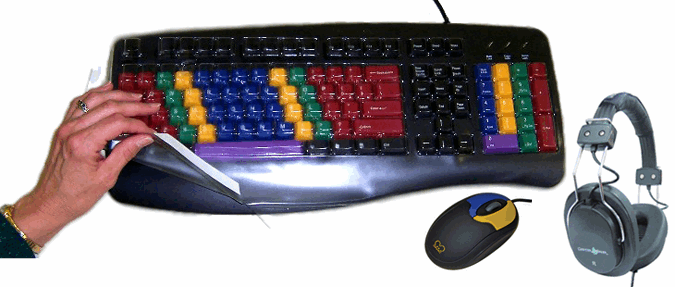
She's taking a look at one of my very favorite CCT products, the LessonBoard Our LessonBoard is coded by finger to help kids and adult alike learn to type in a quick and easy way.  I just wish we had had something like this in my typing class.  We also offer this sweet product as part of a really great classroom bundle, with TinyMouse, Headphones, and keyboard seal.
Buying as a bundle saves you more than $40!

While Cindy mentions covering the keys at a later date with tape, which can be sticky and inconvenient, CCT does also offer the SpeedSkin learning aid, which fit snuggly over the keys and is easily removeable, and will soon be offering keyboard, color coded like the LessonBoard for hand placement, which does not have letter labels at all.  You can expect to see this on the website soon. 

Monday, November 22, 2010

Touch Typing

Touch-typing is a skill wherein the typist does not look at the keyboard, enabling him or her to read while typing.  This significantly increases speed of typing as well as accuracy.

Wikipedia has to say of touch-typing:
Touch typing can efficiently bring an average speed typist to 60 words per minute (WPM) fairly quickly and at the same time increase accuracy by great amounts. Upon learning to touch type, comfortable typing speed is expected to be achieved within a month. The typing speed can be increased gradually with regular practice and speeds around 60wpm could be achieved within a year or so. Many websites and software are available to learn touch typing and many of these are free. Learning touch typing can be stressful both to the fingers as well as the mind in the beginning, but once it is learned to a decent level, it exerts minimal stress on the fingers.
Furthermore,
Studies have also shown that two-finger typists, also known as "Hunt-and-Peck" typists can reach speeds of about 37 wpm when typing memorized text, and 27wpm when copying text.

On the other hand, the average person using the touch type method can reach an average speed of 50 to 70 wpm with some reaching speeds in excess of 80 to 95 wpm. Some touch-typing experts can even reach speeds pf over 120 wpm. (The Benefits of Learning to Touch Type)
One of the biggest obstacles to learning to touch-type is overcoming the urge to peek at the keys.  Many typing teachers have students drape pieces of cloth over the keyboard.  As someone who experienced this in school, I can tell you what many others would: this is a pain in the behind.  Chester Creek has a solution, however.

Our SpeedSkins fit snugly over all standard keyboards, including MacPro keyboards, and covers only letter, number, and punctuation keys.  Additionally, the product is latex-free, durable, and easily washable, making it great for classroom use. 

Ask about our educators' discount!

Categories

3d About us accessories add adhd adults adventures aid android antikythera app artsy asd assistice technology assistive technology augment autism back to school belgium big birthday blog boomer boxes braille bundle buzz canada catalog cd ces chater chest creek chester creek chester creek blog chester creek news chester mouse children childrens choice Christmas chrome church cnn coffee cold colored colorful comics coming soon commerce communication computer computer accessories computer accessorites computers computex consumer copptertop cpsia customer danbit denmark dexterity disability dissident distributors doppleganger duluth ebullient ed expo education elderly email employment eniac enviromental ergnomics ergonomics eye facebook facial recognition facts fall famous february fiber optics fiction flu funkeyboard funkeybundle furtive games genes German germs glaucoma google hacking handicap harbor Headset health heavy metals High visibility history holiday holidays holoday home school homeschool hypertext impaired impairment info information intel international internet ipad italian italy key guard keybaords keyboard keyboard seals keyboarding keyboards kids kidscomputer kinderboard kinect laptop large key large-key large-print lead learn to type learning lessonboard light links little low vision lumbar m-w macular degeneration magic malware mercury merriam-webster mice microsoft minnesota mobile motor mouse national school supply and equipment association netbook network new blog new products new technology new years news nssea number pad numeric occupation therapy occupational therapy office on-the-go outdoors peripheral phones photo portable posture productivity products announcements promotion proteins ramblings readerboard restriction review rohs safety sale sales scary school schools science scores search engines security senior seniors services shellacking shipping shopping sight silly social media social networking software spanish special education special needs special olympics specialneeds specials spectronics speech speedskin spring squirrels staff story students study summer suppliers tablet tablets taipei technology tests text speak textspeak the cloud tinymouse tips touch-typing trade show typing vacation viruses vision visionboard vocabulary wave weather web what's new wifi windows winter wireless words work wrapping www